Showing posts with label Programming. Show all posts

Monday, January 29, 2018

Java: Switches

Throughout my time programming, there have been many times where I needed to get an input from a user, and depending on what they inputted, I needed to run different code. There are multiple ways of accomplishing this, however some methods are faster than others and much easier to work with.

In most programming, the way to do this would be to use a lot of if and else statements, chained together. The first if statement checks if a certain value is true, and if so, it runs the following code. However, if the value is false, it goes on to the else statement, or else if statement. The else statement runs the next code without question, however the else if statement acts just like the first if statement. This means that you can chain lots of these together to test for different possible inputs, and only the code for the user's input will be run.

As you can see, this option will get long and confusing as more options are added due to the difficulty to read the code. There is so much extra code that is required that the code that is more important is easily lost. Barry Burd, a computer science educator with a PhD, wrote that lots of if statements seems wasteful and "why not create a statement that checks the value of [a variable] just once and then takes an action based on the value it finds?" (Burd 132). Luckily, there is a simple solution to the problem. Several years ago, a new feature was implemented into Java that allowed switches to replace the complex if and else statements. This new method was short, simple and easy to use and understand, plus it was scalab.e This meant that if there was anything that needed changes, it would be easy to change.

As you can see in the second image, each if statement has been replaced by a case statement inside of the switch. The switch defines what variable to check, and the cases define what options the variable can be. Burd explained that "the computer checks the value of the [inputted] variable. When the computer determines that the [inputted] variable's value is 2, the computer checks the case of the switch statement. The value 2 doesn't match the topmost case, so the computer proceeds to the middle of the three cases. The value posted for the middle case (the number 2) matches the value of the [inputted] variable, so the computer executes the statements that come immediately after case 2" (Burd 133). This was still a problem for me, because if a user inputted text such as "strONGly agRee", the code wouldn't recognize it. To solve this, I decided to first make the variable lowercase, then checked for all lowercase answers as there is no way to ignore the case of each answer as I could in the first method.

Other than that, this method is extremely useful and much easier to use! The code is simpler, easier to understand and easier to add on to if future changes are necessary. All of this adds up to make switches a great addition to the programming language, and something that should be taken full advantage of!

Have you ever tried to repeat a task over and over, only to get tired of it before you were even done?

Works Cited:
Burd, Barry. Java for Dummies. 7th ed., John Wiley & Sons, 2017.

Wednesday, January 24, 2018

Java: Databases and Data Storage

When writing code in any language, it is almost always important to be able to store lots of data. Depending on the scenario, there are many ways of keeping your data safe in Java.

A very popular data organization and storage method is to use an external database, such as a MySQL server. Your program can then connect to this server and send it data, as well as retrieve data from it in huge quantities. This is great for things such as storing lots of user accounts, details on a library of files, or other various data in large amounts. To demonstrate this, I created a simple function that when run, will connect to the specified database and will create a table to store data in.

The database can be thought of as a library full of books, each book being a table. Within each table, there are spreadsheets of data, with columns to label the data, and individual rows of data spanning across the columns. This is just like spreadsheets in programs such as Excel!

Data storage is such an important part of programming, that throughout Barry Burd's career, the general consensus about programming from his students was that "We don't need to make attractive-looking layouts. No glitzy GUIs for us. We need to access databases. Yup, just show us how to write Java programs that talk to databases" (Burd 445).

While this piece of code only creates a new table, the same code can be reused to add, remove and get data from the database as well because of the SQL standard that most databases follow in order to simplify things.

Another way of storing data is to use collections. However, collections won't persist across restarts of the program. By using this in conjunction with databases, the program can be much faster and easier to use. The program can start by storing data in a collection, and it can periodically update the database to make sure it's data matches what is inside the local collections. This will ensure that the data is saved, but by reducing the amount of times the database has to be accessed, it makes the program faster. Comparing this to the library from earlier, it wouldn't be very efficient to drive to the library and write down the details of a user into a book every time they submitted a change. Instead, by driving to the library only at the end of each day, lots of time and money is saved.

Here, I wrote a simple class with a collection called an ArrayList. To put it simply, an ArrayList is just a list of values. The collection, called names, stores a list of all usernames. There's a function to add a name, to remove a name and to check if a name is already in the collection. While this is just a simple example, the concept can scale very well and be easily expanded to suit the needs of almost any program. The benefit to collections over simpler data storage methods such as arrays, is that if you're keeping track of your users and you have an array, the array has a set maximum value. Similarly to a hotel with a limited number of rooms. For example, if you have 100 rooms, "All is well until, one day, customer number 101 shows up. As your program runs, you enter data for customer 101, hoping desperately that the array with 100 components can expand to fit your growing needs. No suck luck" (Burd 322). Collections expand on this simple concept and are scalable, easily expanding and shrinking to fit your needs and to minimize the usage of the limited space on the computer.

Have you ever tried storing lots of data somewhere and keep it nicely organized? Or even tried to organize your room and keep it that way for longer than a month? Is it a challenge, or does it just come naturally to you?

Works Cited:
Burd, Barry. Java for Dummies. 7th ed., John Wiley & Sons, 2017.

Sunday, January 21, 2018

JavaScript: "Bad Parts"

Just like we have imperfections, JavaScript has some "bad parts", which are highlighted by Douglas Crockford in JavaScript: The Good Parts. Some of these features are difficult to understand without extensive experience in JavaScript, making it extremely easy to misuse a function or statement.

I have sometimes misused these functions before when I was writing code. At first it was really confusing why the code was not running, and I was really confused. At this time, I was just starting to learn about JavaScript's shorthand and its "with" statement. I initially thought it was a shortcut and a faster way to compile and write code, but I was proven wrong, as Crockford describes the with function "the with statement significantly slows down JavaScript processors because it frustrates the lexical binding of variable names" (Crockford 110). This means that it confuses JavaScript when you use it, thus leading to an unpredictable result.

Using the "with" statement is highly discouraged
While I was trying to use the with function, the code did not allow me to run, showing me a warning that I should never use 'with' (right). As a concept with good intentions, 'with' was never successful. It was meant to be a function that provides a shorthand when accessing the properties of an object (Crockford 110). It was originally meant to be a shortcut, but instead it was just a nuisance to writing code.

Next, after learning about how the 'with' function messes up the clarity of the code, I tried to find a surefire way to write what I wanted without confusing JavaScript. What I wanted to do was simply state that the variable a equaled variable "b".


The result was exactly how I expected it to turn out, and involved a significantly lower of risk. It was able to properly execute the function with ease. What I learned was that there was always a better and safer way to do something, as shown below where I used more keystrokes than when I used the 'with' function.
Function without using 'with'

Another confusing feature of JavaScript that I found was 'eval'. Eval, defined by Crockford, is a function that gives a string to the JavaScript compiler to execute a certain command (Crockford 110).  Simply, eval is something used to evaluate a string as a JavaScript expression. It is often the most misused feature of JavaScript because of how much experience is required to correctly execute it. Even if one could employ the 'eval' function, it is still highly discouraged, simply for the clarity of the code, which 'eval' fogs up. For example:
Eval statement reducing the clarity of the code
Learning about the bad parts of JavaScript really helped to show me what not to do or use when writing code. It was a great learning experience, and overall greatly improved my understanding of code clarity, and how some of the weaker concepts can affect it. Without the assistance of Crockford, my work would be much different and ineffective, and I would have ended up using some of the lesser preferred functions. My advice? Always stick to using the preferred methods, and avoid the ones that are discouraged.

Question: What is your opinion on the way to solve something? Do you believe there should only be one way to do something, or should there be a diversity of solutions?

Works Cited:
Crockford, Douglas. JavaScript: The Good Parts. O'Reilly Media, Inc., 2008.

Monday, January 15, 2018

JavaScript: Functions

In JavaScript, functions are one of the main components of writing code. A function can be anything that "encloses a set of statements" (Crockford 26). For new programmers like me, functions can be very confusing to learn, but are essential in order to create complex code. Over time, however, the learning process pays off, allowing you to employ functions and use them to your advantage.

Since functions have a broad definition, they can be found in nearly any set of code. For example, a simple function literal, which includes four parts. Respectively, the function literal's parts consists of the word function, the functions name, the parameters of the function, and the statements in curly braces (Crockford 27).  Since I am just starting to learn how to create functions, I was only able to make a simple one, a function literal that can retrieve someone's information.
An example of a function literal.
I am still very new to JavaScript, and so far the most confusing thing so far are functions, probably because of my inexperience with style and syntax. In my learning to understand functions, I found that instead of skipping to the big ideas, I should start small. In the case of literal functions, learning what returns are can be very helpful in understanding the larger concept of functions.

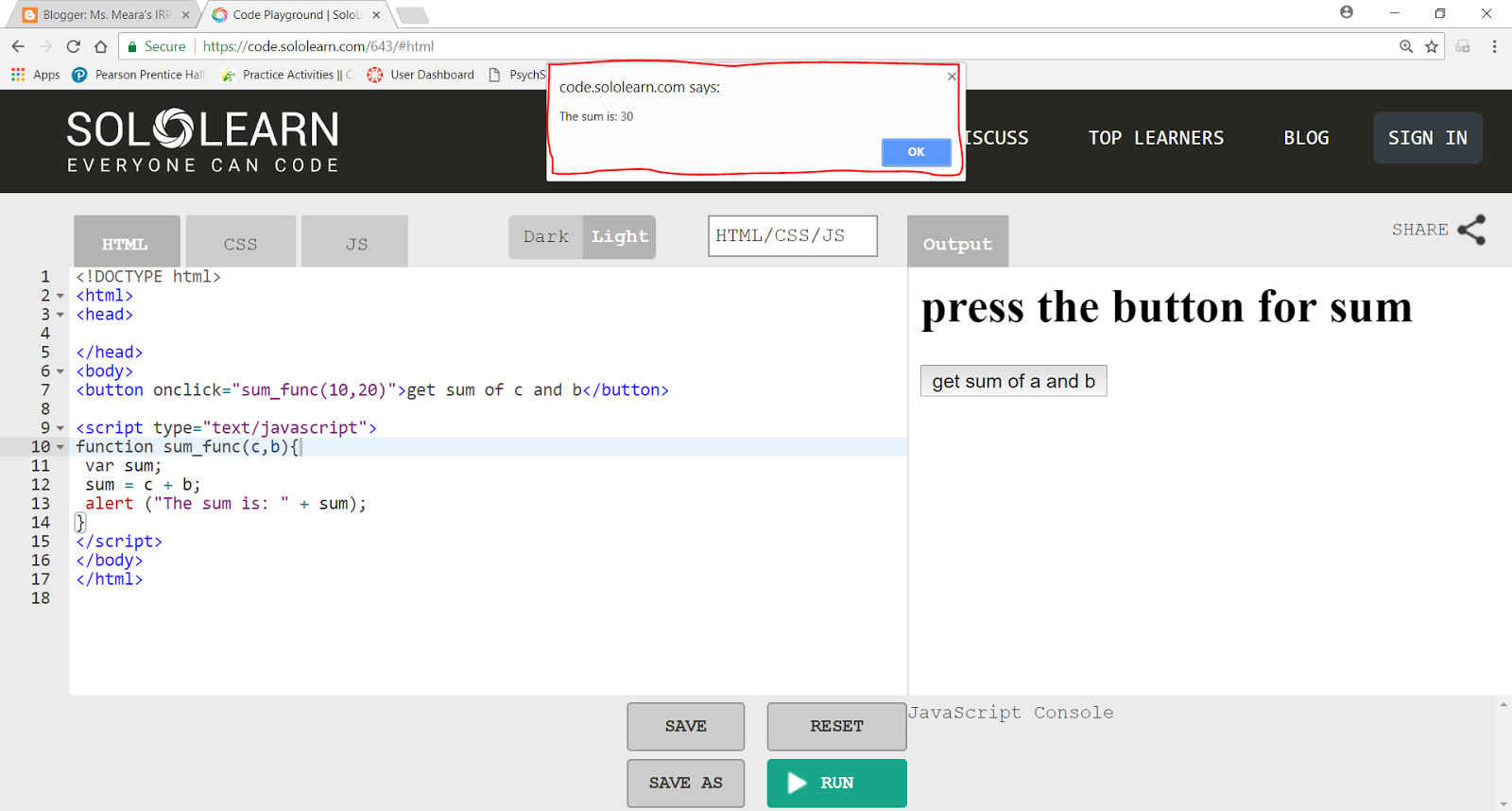
A return is a statement that can be used to cause a function to return early, meaning that it instantly executes the function and ignores the remaining statements. To practice return functions, I made a statement that gives you the sum of two numbers when you press a button, and one with the return function:
Sum statement without the return function 
Sum statement with the return function
First, I decided to use HTML for JavaScript so I could see the user interface, or the button which says "get sum of c and b". It took me a while to find out how to format the program the way I wanted it to look, but I eventually was able to make it the way I wanted. As for the return function, I included it in one of the programs and left it out in the other to see how the output would differ.

I pressed "RUN" on each of the consoles, and they both gave me some different results, as I had predicted. Alluding to Crockford's description of the return statement, it made sense that one of the programs gave an output through an alert, or a pop-up notification on the top of the screen.
Run Button
In line 12, the return function was present, and this caused the program to completely ignore the alert, and so when I pressed the button there was no pop-up giving me the sum of C and B, which was 30.

Line 12 with the return function

This was definitely a great learning experience for me. I was able to realize that the individual parts are what make up the sum of the larger parts, and gave me a chance to open my eyes to new learning processes!

Question: How do you complete your tasks? Do you agree that the small portions are as significant as the bigger whole?

Works Cited:
Crockford, Douglas. JavaScript: The Good Parts. O'Reilly Media, Inc., 2008.

Sunday, December 31, 2017

Java: Abstract Classes and Interfaces

Building on what I learned previously, Java also makes use of abstract classes. These special objects can't be used on their own, but are more of a building block that other, more complex objects are built upon. "An abstract class has no life of its own. In order to use an abstract class, you have to create an ordinary (non-abstract) class that extends the abstract class" (Burd 419).

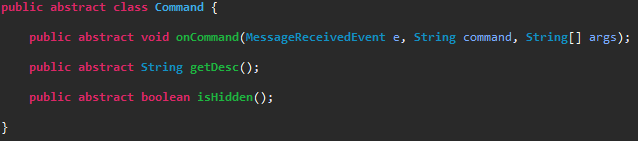
From the last example, I made an abstract class called Command. This object can't be made on it's own, as it has no actual function, but is what makes sure that all future commands based on this will follow the same hierarchy.

These abstract classes are important because without the class being abstract, someone, including yourself, might accidentally try to create an instance of the abstract class, which shouldn't happen. Adding abstract ensures that the code won't be misused accidentally. By adding abstract methods, or functions, this means that all classes that are based on it must create their own code for those methods. The benefit to using abstract classes to be extended over other similar types of classes such as interfaces is that a child can only inherit from one abstract class, but can inherit from many interfaces. This means you can limit the inheritance of a child, preventing a mess of many different inherited methods and variables.

However, with interfaces, a child can inherit from many different interfaces at the same time. This means that you can have an interface for commands that are for staff and commands that are only allowed to be used in certain groups. As an example, "[Barry is] an instance of  a Person class with all the fields that any person has - name, address, age, height, weight, and so on. He can also implement more than one interface: Because Barry implements a Professor interface, he must have methods named teachStudents, adviseStudents, and gradePapers. Because he implements an Author interface, he must have methods named writeChapters, reviewChapters, answerEmail, and so on" (Burd 411).

Here I made a command that is used to change the prefix that is used before a command in chat so that the program can tell the difference between a chat message and a command. The command extends a command, so it inherits the structure of a command, and also implements StaffCommand and RestrictedCommand. The StaffCommand inheritance requires the permissionLevel function which gives a number used to represent a hierarchical system where the lower the number, the less permissions the user has. Therefore, this command requires a user with permissions of 4 or greater. The RestrictedCommand inheritance requires the canUseCommand function. This takes the chat channel that the message was sent in and if the channel's ID matches the one provided, the command can be used. Otherwise, the command will not be run.


Do you think that having multiple systems of inheritance is more confusing, or is it nice to have a greater variety of tools to work with in order to keep everything organized and categorized?

Works Cited:
Burd, Barry. Java for Dummies. 7th ed., John Wiley & Sons, 2017.

JavaScript: Style

One of the most important things to remember when writing code is style. Style, in comparison to the real world is simply making the program better and easier to read. Although it can be a small part in the code and how it executes, it makes a huge difference in how the programmer/computer can read and interpret it. There can be many types of styles depending on the programmer, with no true "correct" form. Learning how to properly style your code can be extremely confusing and difficult, but is necessary for successful coding.

Because I am new to programming, this can be one of the most difficult things for me to master and  learn. I often made minute mistakes that cost me quite a bit of time. "Code that appears to mean one thing but actually means another is likely to cause bugs" (Crockford 96). I practiced on SoloLearn and tried to find and fix some of my errors, and see if any of them had a "hidden function" that would interfere with the function I wanted it to run.


Original Code with error
Error code's real output
While searching for errors, I found one of my errors, as the original code on the right was programmed incorrectly, and resulted in the one on the left. It was because I put the brace symbol "}" in the wrong spot, causing the program to misunderstand what you were writing. This can often be confusing, because in JavaScript, the way you write code is extremely important, and even a seemingly insignificant mishap can detract from the code's function.

Style is nearly everything you write in the program to make it easier to read, which includes comments. Code in the form of comments, or lines with two backslashes in front can give readers more information on the program, such as what the programmer was thinking or leaving important to-do messages (Crockford 96). In my code, I often use comments such as these to help me remember what I did with the code, or its functions. As a new programmer, it can be confusing for me to look back and remember what I was thinking/doing. These have helped me greatly, since I am busy with things other than coding, and I spread my programming time over a large period to prioritize other tasks. I often forget my thoughts during the coding session, especially after being away for long periods of time. Comments, however, refresh my memory, so using them can set me on track to finish my code.
Creating a comment in green

Comments do not affect the code, but they can be part of the backbone of the code, since they are there solely for the purpose of clarification. Making effective and useful comments can greatly improve how easily the program can be understood by programmers, and thus play a large part in the code's style.

Through my trial and error, I have learned more about how to style my code to make it as easy as possible for the machine to understand what I am inputting. It may not seem important at first, but as you start creating more advanced programs, it becomes clear how crucial it is to have proper style and formatting.

Question: How does style play a role in your life? Does the way you perform your tasks or work affect its outcome? 
Works Cited:
Crockford, Douglas. JavaScript: The Good Parts. O'Reilly Media, Inc., 2008.


Friday, December 29, 2017

Java: Working with Objects

When programming, it is important to use objects to help reduce the amount of redundant code and make the program faster. It is also useful as reducing redundancies will help organizing the code to make it easier to read and understand, especially when dealing with many different instances, such as multiple users. "The question is, when writing a computer program to deal with accounts, how do I separate my balance variable from your balance variable?" (Burd 162).

On the popular chat service, Discord, I created a program that can have different commands the users  can use to make the program do different things such as showing data or statistics about a user. To make the software simpler, I made a single type of object called Command. Then all commands I make can be based on that generic Command object. This means that if I wanted to substitute one command for another, I can easily do so without changing much of the code if I base everything off the generic object rather than specific commands.


Here's a simple Command object with 3 functions. There is the onCommand function, that I can run with some variables to make the command run it's unique code that varies between commands. There is also the getDesc function that just returns a description about what the command does, and finally the isHidden function that returns whether or not to hide the command from the help menu.
From the example in the book with bank accounts, Burd says that "the Account class... defines what it means to be an Account. In particular, [the code] tells you that each of the Account class's instances has three variables: name, address and balance" (Burd 163). Anything that is an account must have the same three variables no matter what.

Here's a sample command I wrote called ping. When it is run, it will display the program's current ping in the chat. The ping is the amount of latency or time between when it contacts the Discord servers and when the Discord servers can send information back to the program, so the lower the ping, the faster and more responsive the program can be. The sample command "extends", or inherits the basic structure of the generic Command object. Then it has the onCommand function which sends a message back to the user who executed the command with the ping. The getDesc function gives t he description, "Pong!", as the return message from a ping is known as a pong message. And finally, the isHidden function will return false, as the command should not be hidden from the help menu.
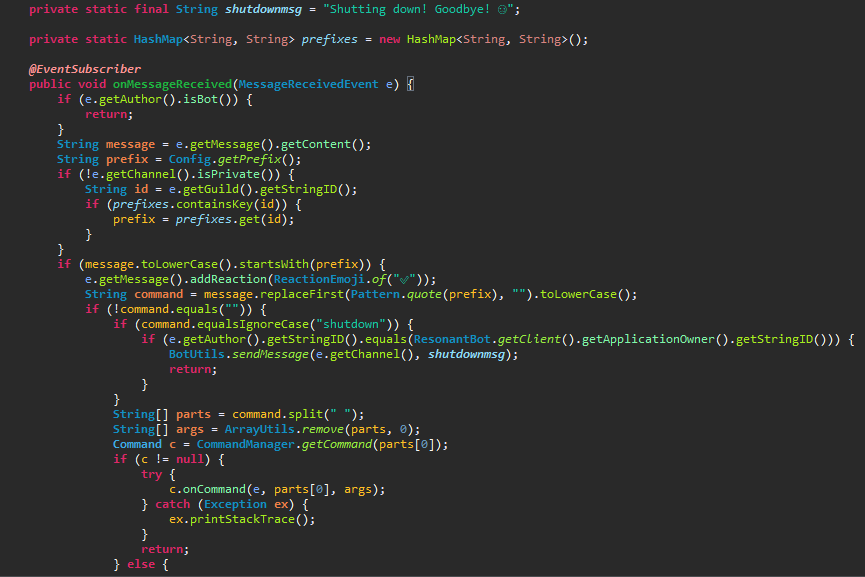
Finally, putting this all together, the code gets another object called the CommandManager, which keeps a list of all commands, and it searches for a command based on what the user inputs. If no command is found, it stops there. However, if a command is found, it can run the onCommand function with the proper variables because any code for a command will always have an onCommand function as the generic Command object defines the structure of any command.

What do you think of the simplicity of having a single "parent" object that all "children" objects must inherit traits from? Does it make the code simpler as all child objects are alike, or is it more complex for child objects to be forced to conform to the parent's traits?

Works Cited:
Burd, Barry. Java for Dummies. 7th ed., John Wiley & Sons, 2017.

Tuesday, December 26, 2017

JavaScript: Punctuation

Before starting to write more difficult lines of code, I have to know the grammar rules of JavaScript. Grammar, as defined by Douglas Crockford is how the computer language is built and structured (Crockford 5). Because grammar is a large part in the language's structure, I will have to practice in order for me to code efficiently. Additionally, the strength and accuracy of the grammar will directly correspond to the integrity of the code and how it will perform. Having flawless grammar will be challenging to master, but it will become necessary in the future to successfully code.

One of the many forms of punctuation introduced by Crockford is whitespacing. Whitespacing, simply, is having a blank space to separate characters. Crockford mentions that "whitespace is usually insignificant, but is it occasionally necessary to use whitespace..." (Crockford 5). Although Crockford states that whitespace can be more or less unimportant, I find that it makes a significant difference in writing and editing code, since the spaces make it much easier to read. However, I was still hesitant in putting a small space between words.
Code with whitespacing

Code without whitespacing

Making your code easier to read can be extremely beneficial, not only for you, but peers who investigate your code. When something is easy to read and understand, the process for revision and editing becomes significantly less difficult. Again, I was hesitant to go the extra mile for readability, but after having my dad, a software engineer, explain to me how important readability was, I realized how important it could be, and made it into a habit to whitespace consistently. With my newfound knowledge of punctuation, I was able to more code with much more efficiency and clarity, allowing for easy revision and readability.

After a few hours of experimenting with a multitude of grammar and conventions using Crockford's guide, I created a simple visual reference chart for the future as I start learning how to create advanced and complex code. The testing process helped me better understand what to do with some of the conventions. Just as writing helps to reform memory, continuously writing code reinforces my understanding of computer language.


When I finished my attempts to practice and learn the grammar of JavaScript, I had gained more understanding of how and when to use some commands, and what I should type. Additionally, I had learned that the learning process can be extremely slow and difficult, and possibly boring, but it can pay off in the end when you have mastered the contents.

After reading this, would you like to try to learn something difficult? If you have already done so, when have you devoted time and effort into learning something?
Works Cited:
Crockford, Douglas. JavaScript: The Good Parts. O'Reilly Media, Inc., 2008.

Thursday, November 30, 2017

Java: Classes and Code Organization

I have been programming in Java for over 6 years now, but because I was never formally taught the language, there are likely some things that I do that aren't part of the official standards, or things that may cause the code to be inefficient or hard to work with. In Java for dummies by Barry Burd, the basics of Java are covered as well as more complex topics and how to keep the code organized and effective without becoming a nuisance to work on.

Small sample program that is
easy to understand and work with.
Output of above program.
When learning programming, people start with very basic programs that don't do much. In these small programs, inefficiencies and confusing code don't matter very much, but as the program grows and gets increasingly complex, these small problems add up making future changes more difficult and causing the program to be slow. "For years, companies were buying prewritten code, only to discover that the code didn't do what they wanted it to do... Their programmers dug deep into the program files, changed variable names, moved subprograms around, reworked formulas and generally made the code worse" (Burd 198). This emphasizes the importance of keeping the code neat and easy to work with from the start because if the code is difficult to understand, even the programmer will eventually be unable to figure out what's going on.

More complex part of a program that
determines what code to run next.
As shown in the picture on the right, code can quickly become more complex and difficult to understand.

To organize this code, Java has classes which are used to put related code all in one file, while keeping less relevant code in another file. This helps with organization, similarly to how a book is divided into chapters.
Code all put into a single class
without being properly organized.


On the left is part of the original code when all of it is in a single class. As you can see, it's long and confusing with so much there that you can't easily see all of it at once.
Simplified code that is properly organized
and distributed throughout multiple classes.

However, below that image is a simplified version where I have put the code responsible for loading add-ins into a separate class. It is now easy to see that the single
Code for "loadJars()" method shown above.
function, known as a method in Java, "loadJars()" will load the add-ins from the other class.

Below that is a third image, which shows the code that is run when the "loadJars()" method is used. This is much easier to understand and won't result in as much confusion down the road. As you can see, even the "loadJars()" method contains another method, "loadJar(f, false)" that loads each specific file.

By putting methods within other methods, the code is even neater and simpler to understand! This is known as object-oriented programming, where "all the functionality that's associated with an [object] is collected inside the code for the [Object] class" (Burd 170).


What do you think of the organization used in modern, object-oriented programming languages? Does it make the code look neater and less confusing, or is the condensed form easier to follow as the code doesn't jump around?

Works Cited:
Burd, Barry. Java for Dummies. 7th ed., John Wiley & Sons, 2017.

JavaScript: Introduction

William Nguyen

JavaScript: The Good Parts, Douglas Crockford

Programming can often be seen as extremely difficult and time consuming to learn. This is not always the case, as it can easily be learned by anyone who simply devotes their time and effort. Learning a computer language can be extremely beneficial for those who are interested in a path down the quickly-growing technology field, as the pay and demand for experienced programmers are extremely high.

There are a vast amount of programming languages that are available to learners, each with their own purpose, such as C++, C#, Python, etc. However, I will be focusing on JavaScript, one of the most demanded languages in the job industry.

What exactly is JavaScript? JavaScript is the primary language that web browsers use, making it one of the most popular programming languages in the world (Crockford 2). This means it can be used to create web interactive elements such as text, or create complex applications and programs. In my practice to eventually master the language, I have chosen to create a simple program that responds with text based on whether a given statement is true or false. To create this program, I first need to obtain a console, which is a text-only interface that runs computer languages. Luckily, there are a multitude of consoles readily available on the internet, some with helpful guides, which I found out about when I started to learn how to program.
SoloLearn, the console I am using


After I found my console, I started to play with some of the code and test some different functions, seeing how JavaScript worked. As it turned out, many of my statements had mistakes, making it impossible for them to execute properly.  I found that it is necessary and extremely important to have good syntax when programming if you want your code to function. From this, I realized that I was essentially "speaking to the computer", and similarly to real life situations, if you do not communicate clearly, the person will not be able to do the job properly.


Syntax errors in red

 
The correct output

I made a significant amount of mistakes, but even the smallest error can make a huge impact on the how the code runs. In addition, errors can cost us large amounts of time to fix. "The sooner we can detect and repair errors, the less they cost us. JavaScript is a loosely typed language..." (Crockford 3). This means that JavaScript's software is unforgiving when it comes to mistakes, and this shows that in order to not waste precious time finding/fixing mistakes, we need to construct code accurately the first time. I noticed that I was constantly making mistakes by overlooking the minuscule details. After realizing what I was doing wrong, I was able to change the way I wrote code. Instead of typing and moving onto the next line without looking back, I made sure to double-check my work for syntax errors. This was extremely effective, as it became a helpful habit.


Code working properly!
Close-up of edited code

Practicing to master my new technique took quite a bit of trial and error, but as a result, my code was working much more often!


Question: Have you ever tried or thought about starting to learn how to code? If so, what are your thoughts on the learning process, and if not, what is your opinion on  starting to learn something                                                                  completely new?  


Works Cited:
Crockford, Douglas. JavaScript: The Good Parts. O'Reilly Media, Inc., 2008.